
Bank flagged your transaction? Learn the real reasons, how to fix it fast, and avoid account freezes. Step-by-step guide with real examples. In this article, let’s talk about why the bank flagged your payment.
You try to make a payment.
Everything looks normal. You have money in your account. Your card works fine.
But suddenly —
“Transaction Declined”
or worse —
“Suspicious Activity Detected”
Now your heart starts racing.
You’re thinking:
- Did I get hacked?
- Is my account going to be frozen?
- Did I do something illegal without knowing?
Here’s the truth most banks don’t clearly tell you:
Your transaction wasn’t random. It was flagged for a reason.
And if you don’t fix it quickly, it can escalate into:
- Account freeze
- Payment blocks
- Even permanent restrictions
Let’s break this down properly — no fluff, no theory — just real reasons and real fixes.
Quick Answer Box
Why did your bank flag your transaction?
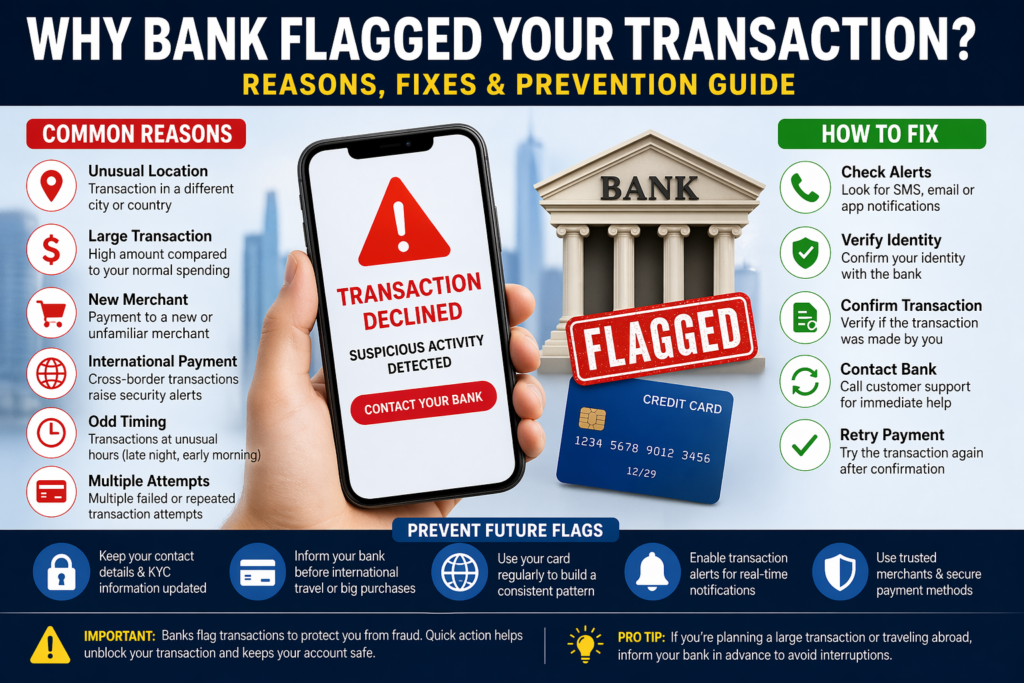
Banks flag transactions when they detect unusual or risky activity, such as:
- Spending pattern change
- Large or sudden transactions
- International payments
- Unknown merchant
- Possible fraud signals
How to fix it fast:
- Verify the transaction via SMS/email
- Contact your bank immediately
- Confirm your identity
- Retry the payment
- Avoid repeating risky behavior
Why This Problem Happens (Real Reasons, Not Textbook)
Banks don’t “guess.”
They use AI-based fraud detection systems. And these systems are extremely sensitive.
Here’s what actually triggers them:
1. Sudden Change in Spending Pattern
If you usually spend $50–$100 and suddenly make a $2,000 payment…
Boom. Flagged.
2. First-Time Merchant Payment
New website, unknown seller, or low-trust business = risk.
Especially:
- Crypto sites
- Gambling platforms
- Foreign e-commerce
3. International Transactions
Even legit payments get flagged if:
- Country is high-risk
- Currency mismatch
- No prior history
4. Multiple Failed Attempts
Trying 3–4 times after decline?
Bank thinks:
“This looks like a fraud attempt.”
5. Odd Timing
Transactions at:
- 2 AM
- Different timezone
- Sudden location change
Raises red flags.
6. Card Not Used Recently
Inactive account suddenly active = suspicious.
7. Security Triggers (Behind the Scenes)
Banks track:
- Device used
- IP address
- Location
- Merchant category
You don’t see this — but they do.
8. Merchant Category Code (MCC) Risk
Every business has a category code.
High-risk categories:
- Crypto exchanges
- Online betting
- Adult platforms
- Forex trading sites
Even if the payment is legit → auto suspicion
9. Geo-Location Mismatch
Example:
- Your phone shows India
- Transaction request comes from USA
Bank thinks:
“Impossible movement → possible fraud”
10. Device Fingerprint Change
Banks track:
- Browser
- Device ID
- Operating system
New device = new risk.
11. Velocity Spending Pattern
Too many transactions in short time:
- 5 payments in 2 minutes
- Multiple merchants rapidly
System flags it as:
“Bot-like activity”
12. Card Not Present (CNP) Risk
Online transactions (no physical card) are:
- More risky
- More likely to be flagged
13. Expired or Recently Replaced Card Usage
Using:
- Old saved card details
- Recently replaced card
Triggers mismatch alerts.
14. Recurring Payments Suddenly Increasing
Example:
- Netflix = $10/month
- Suddenly = $100 charge
Flagged instantly.
15. Blacklisted Merchant Database
Banks maintain internal lists.
If merchant is:
- Previously reported
- Linked to fraud
Your transaction gets blocked — even if YOU trust it.
Advanced Fixes (Edge Cases)
Case 1: No Alert Received at All
What to do:
- Check spam email
- Check alternate phone number
- Login to net banking → security alerts
Still nothing?
→ Call bank immediately and ask:
“Was my transaction blocked by fraud system?”
Case 2: International Payment Keeps Failing
Fix:
- Enable international usage in card settings
- Inform bank before retry
- Use same device/location
Case 3: Subscription Payment Getting Blocked
Fix:
- Whitelist merchant via bank
- Use same card consistently
- Avoid switching payment methods frequently
Case 4: Payment Works on One Site but Not Another
Reason:
- Merchant risk score differs
Fix:
- Try trusted platform
- Use PayPal / secure gateway
Case 5: Account Temporarily Frozen
Do this:
- Call bank
- Submit ID proof
- Confirm recent transactions
- Wait for compliance clearance
Case 6: Card Blocked Completely
Fix:
- Request unblock
- Or issue new card
Insider Strategies to Avoid Flags Permanently
This is where you beat 90% of users.
Strategy 1: Warm-Up New Spending Behavior
Don’t jump from:
$50 → $2000
Instead:
- $200
- $500
- then large payment
Strategy 2: Build Merchant Trust Pattern
Repeat payments to same platforms:
- Amazon
- Apple
- Known brands
Bank builds confidence.
Strategy 3: Use One Primary Device
Avoid switching:
- Laptop → mobile → tablet
Consistency reduces flags.
Strategy 4: Maintain Stable Location
Traveling?
→ Inform bank.
Strategy 5: Avoid Midnight Transactions for Large Amounts
Time matters more than you think.
Strategy 6: Enable All Alerts
- SMS
- App
Speed = control.
Strategy 7: Keep KYC Updated
Outdated KYC = higher suspicion score.
Strategy 8: Use Trusted Payment Gateways
Safer options:
- PayPal
- Stripe
Data Table
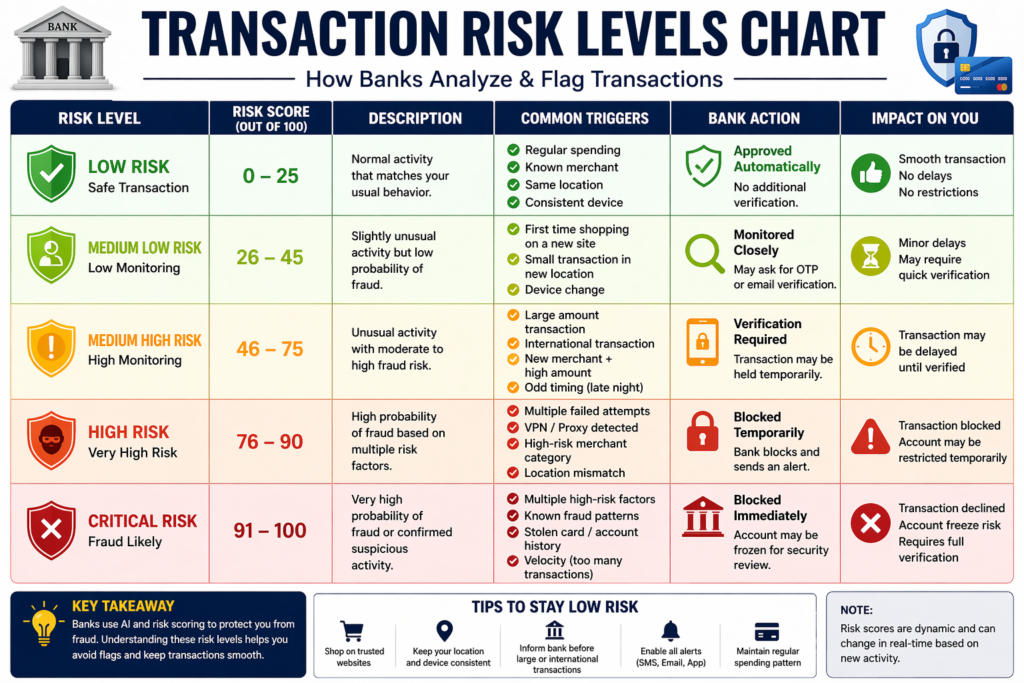
Transaction Risk Score Breakdown
| Behavior | Risk Score | Impact |
|---|---|---|
| Same merchant repeat | Low | Safe |
| New merchant | Medium | Monitor |
| International payment | High | Likely flag |
| Large amount spike | Very High | Immediate block |
| Multiple retries | Critical | Account freeze risk |
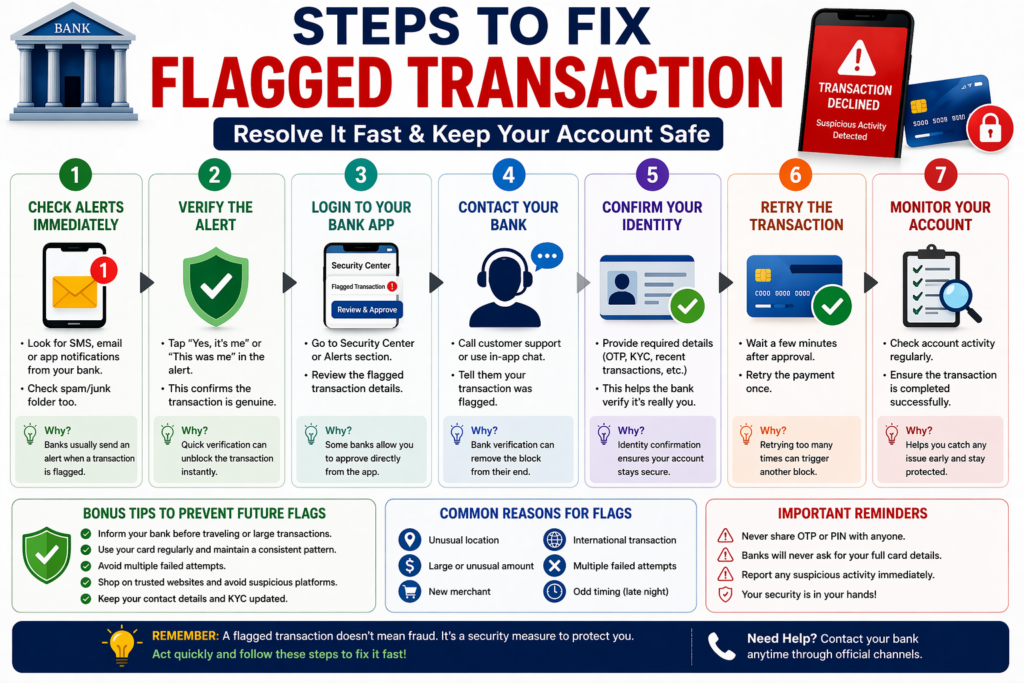
Step-by-Step Solution (What Actually Works)
Step 1: Check Your Messages Immediately
Banks usually send:
- SMS
- App notification
Look for:
“Was this you?”
If yes → confirm it.
Step 2: Open Your Banking App
Most banks now allow:
- One-tap approval
- Fraud confirmation
Do it instantly.
Step 3: Call Customer Support (If Still Blocked)
Don’t wait.
Say clearly:
“I’m trying to approve a flagged transaction.”
They will:
- Verify your identity
- Remove the block
Step 4: Retry Transaction Properly
Important:
Do NOT:
- Spam retry
- Change amounts randomly
Just retry once after approval.
Step 5: Inform Bank Before Big Transactions (Pro Move)
Planning:
- Travel
- Large purchase
- International payment
Call bank first.
This reduces flag risk by 80%.
Insider Insights (How Banks Actually Think)
Here’s something most articles won’t tell you:
Banks don’t care about your intention.
They care about risk probability.
Their system works like this:
| Factor | Risk Level |
|---|---|
| Known merchant | Low |
| New merchant | Medium |
| International + new | High |
| Large amount + unusual | Very High |
If your transaction hits multiple risk factors → auto-flag
Even if it’s YOU.
Real-Life Case Study (USA)
John (California) tried to buy a $1,500 laptop from a new website.
What happened:
- First-time merchant
- High amount
- Late-night purchase
Result:
- Transaction declined
- Card temporarily blocked
What he did:
- Ignored SMS
- Retried 4 times
Result:
- Account flagged for fraud
Fix:
- Called bank
- Verified identity
- Got account restored in 24 hours
Lesson:
The problem wasn’t the purchase — it was the pattern.
Comparison Table (Fix Options)
| Situation | Best Action | Time to Fix |
|---|---|---|
| SMS alert received | Confirm immediately | 1–2 minutes |
| App notification | Approve in app | Instant |
| No alert | Call bank | 5–15 minutes |
| Account frozen | Full verification | 24–48 hours |
| International block | Pre-inform bank | Preventive |
Mistakes People Make
1. Ignoring Bank Alerts
Big mistake.
Bank assumes fraud → blocks everything.
2. Retrying Multiple Times
This makes it worse.
System thinks:
“Someone is forcing access.”
3. Using Multiple Devices
Laptop + phone + VPN = high risk
4. Not Updating Contact Info
Missed alerts = blocked account
5. Panic Transferring Money
Moving funds suddenly can trigger more flags.
6. Using VPN During Payments
Big red flag.
7. Trying Different Cards Repeatedly
Looks like fraud testing behavior.
8. Ignoring Small Declines
Small declines lead to bigger blocks.
9. Sharing OTP Carelessly
Even one mistake = account risk profile increases.
10. Using Suspicious Websites
Cheap deals = high risk.
11. Frequent Refund Requests
Too many refunds → suspicious pattern.
12. Using Someone Else’s Card Frequently
Mismatch in user behavior.
MaintainMarket Expert Advice
If you want to avoid this problem long-term:
- Keep transaction patterns consistent
- Use trusted merchants first
- Avoid VPN during payments
- Inform bank before unusual activity
- Enable app notifications
Think like the bank’s AI system.
If something looks unusual — it WILL react.
Why MaintainMarket is Different
Most websites tell you:
“Contact your bank.”
That’s surface-level advice.
Here, you learned:
- Actual triggers
- Real system logic
- Preventive strategies
- Behavioral fixes
This is what actually solves the problem.
Action Plan (Do This Now)
If your transaction is flagged right now:
- Check SMS/email
- Approve transaction
- Open bank app
- Call support if needed
- Retry once
For future:
- Inform bank before large payments
- Avoid risky platforms
- Keep activity consistent
Conclusion
A flagged transaction is not a punishment.
It’s a warning system.
But if you ignore it or react wrongly, it can turn into:
- Account freeze
- Payment failure
- Financial stress
Handle it smartly, and it becomes a 2-minute fix.
Handle it poorly, and it becomes a 2-day problem.
FAQs – Bank Flagged Your Payment
Q1. Can a bank block my account for one transaction?
Yes, if it looks highly suspicious or risky.
Q2. How long does it take to unflag a transaction?
Usually minutes, but can take up to 48 hours.
Q3. Will I lose my money if transaction is flagged?
No, money stays safe unless fraud is confirmed.
Q4. Why is my debit card declined but I have money?
Likely due to security flag, not balance issue.
Q5. Do international transactions always get flagged?
Not always, but they have higher risk.
Q6. Can VPN cause transaction issues?
Yes, it can trigger fraud detection.
Q7. Should I retry a failed transaction?
Only once after confirming with bank.
Q8. How to prevent this in future?
Maintain consistent behavior and inform bank before unusual activity.
Q9. Why is my transaction flagged even after approval?
Because system still detects risk pattern.
Q10. Can banks reverse flagged transactions?
Yes, if fraud is confirmed.
Q11. Does flagged transaction affect credit score?
No direct impact.
Q12. How many flags before account gets blocked?
Depends on severity, not count.
Q13. Can I whitelist a merchant permanently?
Yes, in many banks.
Q14. Why does my card work offline but not online?
Online = higher fraud risk.
Q15. Is it safe to retry after decline?
Only after confirming with bank.
Q16. Can flagged transactions trigger audits?
In rare cases, yes (especially large amounts).
People searched for: You Earn Well But Still Got Rejected? 5 Hidden Reasons Banks Won’t Approve Your Loan USA
Also read: 15 Best Side Hustles From Home USA (Earn $1000+/Month) – Real Guide 2026
Read: $100? Start Investing in USA (2026 Easy Ways For Beginner)
2 thoughts on “Bank Flagged Your Payment? Here’s What It Really Means (And What to Do Immediately)”